
What We Shipped This Month at Publizo
New this month at Publizo: a Content Library that never loses an article, publishing to Shopify, Ghost, Blogger and custom sites, connection checks that protect your credits, and an autopilot activity log that shows every scheduled run.
Over the past few weeks I have been heads down fixing the things that actually hurt people using Publizo. Not cosmetic tweaks. The real stuff. Articles that vanished after generation. Credits spent on posts that could never publish. Scheduled runs that happened silently with no way to see what went wrong.
This post is the full rundown of what shipped, why it shipped, and what it means if you tried Publizo before and walked away frustrated.
The Content Library
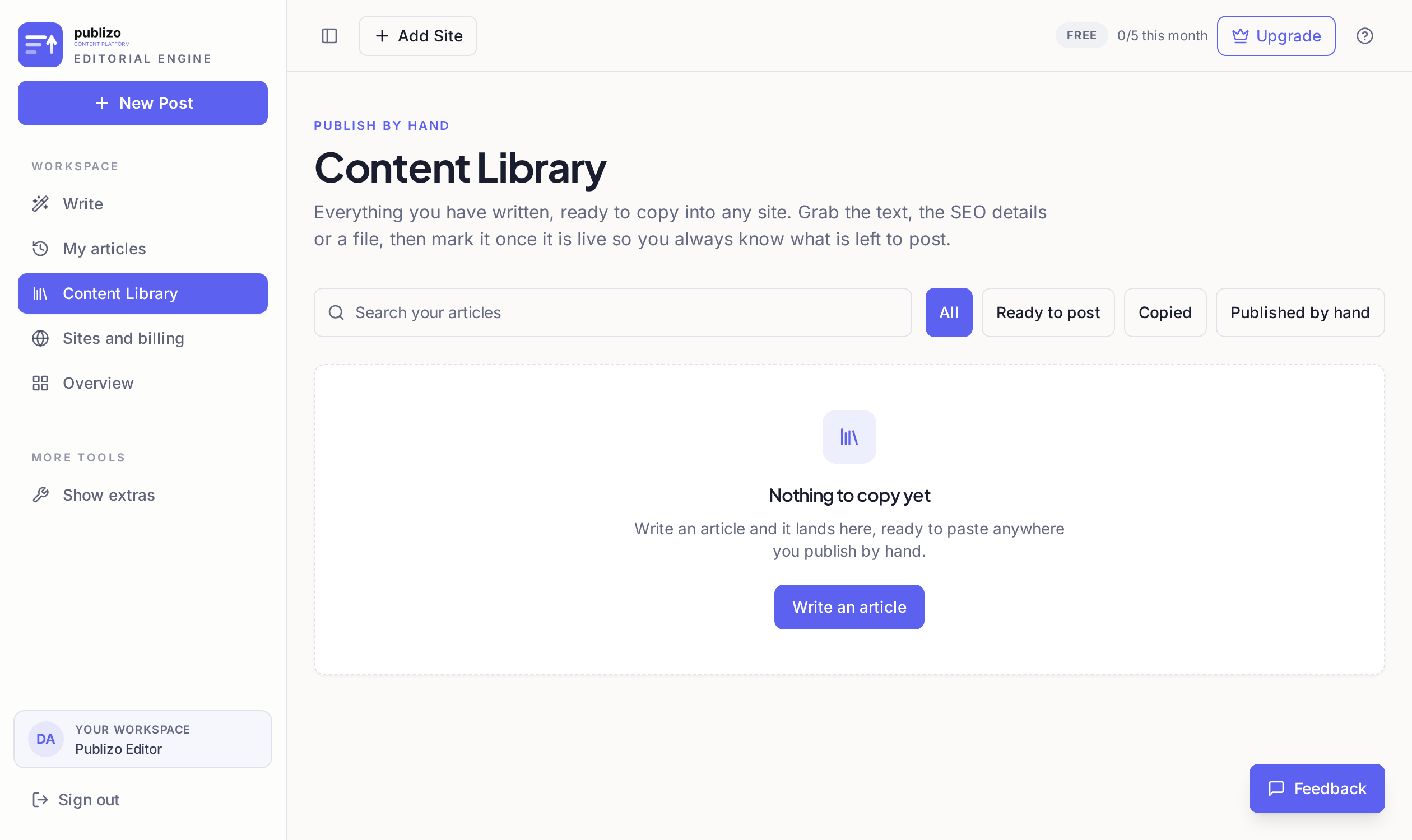
This one exists because of a support conversation I never want to have again. A user generated an article, the publish step failed, and the full text of that article was simply gone. We stored the title and the settings but not the content itself. That was my mistake in how the system was originally designed, and it is fixed now.
Every article Publizo writes is saved in full to your Content Library. You can find it in the sidebar on desktop or under More on your phone. From there you can:
- Copy the formatted HTML, ready to paste into any editor
- Copy clean Markdown with a full frontmatter block at the top, so the file drops straight into Hugo, Astro, Jekyll, Ghost or Obsidian
- Copy plain text or the SEO details like the meta description and focus keyword
- Track each article through Ready to post, Copied, and Published by hand, and save the live link so you always know what is left to do
If you publish manually to a platform we do not connect to yet, the library is now your home base. Nothing gets lost again.
Publishing Beyond WordPress
WordPress is still the smoothest path, but it is no longer the only one. You can now connect:
- Shopify. Create a custom app in your own Shopify admin, paste the access token into Publizo, and articles go to your store blog with tags and the featured image. (Update: Shopify now creates these apps in its Dev Dashboard. See the current steps.) No Shopify app review needed on your side.
- Ghost. Enter your site address and Admin API key, test the connection, and posts publish as drafts or live articles.
- Blogger. Sign in with your Google account and Publizo posts to your own blog under your own name. This one is in Google review right now, so it works for approved test accounts first.
- Any custom site. Give Publizo an https endpoint and it sends finished articles as signed JSON webhooks. If you add a secret, every request carries a signature your server can verify.
Type a Shopify or Blogspot address into the WordPress form and Publizo now tells you where to go instead of letting you connect the wrong thing and fail later.
No More Wasted Credits
This is the change I am most glad about. Before, a scheduled run could write a full article and only then discover your site credentials were wrong. You paid for an article that could never publish. One user racked up 25 failed attempts this way.
Now every scheduled run checks the destination first. Platform, credentials, reachability, posting capability. If any check fails, the run stops before a single word is written. Zero credits spent. The failure is logged with the exact reason so you can fix the connection and carry on.
You can also test any connected site yourself. Each site card in Settings has a connection check that gives you a clear Healthy status or the exact problem, whether it is WordPress, Shopify, Ghost, Blogger or a custom endpoint.
The Autopilot Activity Log
Automated publishing used to be a black box. The scheduler ran, something happened, and you had to go hunting to find out what. Open your autopilot settings now and there is an Activity log tab next to the settings tab. Every scheduled run shows up with its time and result:
- Published or saved as draft, with the topic and a link to the post
- Skipped with zero credits used, plus the reason, like rejected credentials or a site that was offline
- Failed, with what actually went wrong
If you are letting Publizo post for you while you sleep, you deserve to see exactly what it did. Now you can.
Smaller Fixes Worth Mentioning
A few things that were quietly annoying and are now gone:
- The duplicate sign out button in the header is removed. One clear sign out lives in the sidebar.
- Mobile spacing and tap targets got a real pass. Buttons fit their labels and the bottom navigation stays thumb reachable.
- Site connection checks now refuse private and internal addresses, and checkout return links only go to Publizo domains.
- The free preview and sales chat now have per visitor daily limits so they cannot be abused.
What Is Next
Blogger publishing opens to everyone once Google finishes reviewing the app. After that I am looking at the onboarding path for people who sign up and never connect a site, because the health data shows that is where most people stall.
If you tried Publizo before and hit one of the walls above, I would genuinely like you to try again. And if something still breaks, tell me. Every fix in this post started as someone taking the time to report a problem.
Publizo writes articles for your own site.
About what your business sells, in your voice, on your site as a draft or live. 3 full articles over 7 days, no card.
Start your free weekFounder of Publizo. Has run websites since 2016.